# Let's get those Robots moving :)

### You'll need...

- ##### <span class="TextRun MacChromeBold SCXP95092651 BCX0" data-contrast="none" data-usefontface="true" lang="EN-US" xml:lang="EN-US"><span class="NormalTextRun SCXP95092651 BCX0">Dabble app </span></span><span class="EOP SCXP95092651 BCX0">​</span>
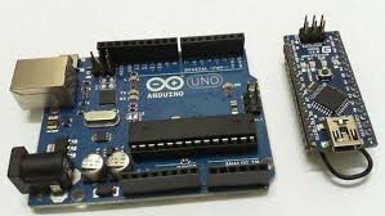
- ##### <span class="TextRun MacChromeBold SCXP95092651 BCX0" data-contrast="none" data-usefontface="true" lang="EN-US" xml:lang="EN-US"><span class="NormalTextRun SCXP95092651 BCX0">Micro-controller </span></span><span class="EOP SCXP95092651 BCX0">​</span>
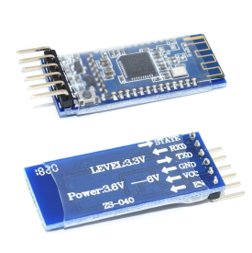
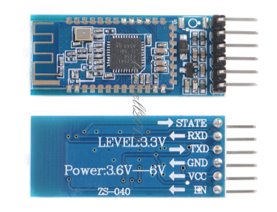
- ##### <span class="TextRun MacChromeBold SCXP95092651 BCX0" data-contrast="none" data-usefontface="true" lang="EN-US" xml:lang="EN-US"><span class="NormalTextRun SCXP95092651 BCX0">HM-</span></span><span class="TextRun MacChromeBold SCXP95092651 BCX0" data-contrast="none" data-usefontface="true" lang="EN-US" xml:lang="EN-US"><span class="NormalTextRun SCXP95092651 BCX0">10 </span></span><span class="TextRun MacChromeBold SCXP95092651 BCX0" data-contrast="none" data-usefontface="true" lang="EN-US" xml:lang="EN-US"><span class="NormalTextRun SCXP95092651 BCX0">Module</span></span><span class="EOP SCXP95092651 BCX0">​</span>
- ##### <span class="TextRun MacChromeBold SCXP95092651 BCX0" data-contrast="none" data-usefontface="true" lang="EN-US" xml:lang="EN-US"><span class="NormalTextRun SCXP95092651 BCX0">Arduino IDE</span></span>

<a class="CID2e4a77e3-3f5e-4b65-94e0-23fbb5b07db9" data-sessionid="37e57817-2d7f-490c-9666-38b582ce322f" data-shapeids="8" data-slideid=""> </a><a class="CID9577f946-d54f-413a-9b32-7ad4f1823a8b" data-sessionid="37e57817-2d7f-490c-9666-38b582ce322f" data-shapeids="7" data-slideid=""> </a><a class="CID55a94c48-ad6e-4095-9d76-433f09a03b16" data-sessionid="37e57817-2d7f-490c-9666-38b582ce322f" data-shapeids="7" data-slideid=""> </a><a class="CID72ac1ce6-8841-442f-959a-fc75ca2615c0" data-sessionid="37e57817-2d7f-490c-9666-38b582ce322f" data-shapeids="8" data-slideid=""> </a><a class="CID55a94c48-ad6e-4095-9d76-433f09a03b16" data-sessionid="37e57817-2d7f-490c-9666-38b582ce322f" data-shapeids="7" data-slideid="">![Amazon.com: HiLetgo 2pcs CC2540 CC2541 AT-09 Serial Wireless Module BLE 4.0  Bluetooth Module Compatible HM-10 : Electronics](https://secretlibrary.rccf.club/uploads/images/gallery/2023-11/2PpWgSFhDByNhJFn-embedded-image-eqknpygp.jpg)</a>[![image.png](https://secretlibrary.rccf.club/uploads/images/gallery/2023-11/scaled-1680-/d4lkoqcVW8YLHQFk-image.png)](https://secretlibrary.rccf.club/uploads/images/gallery/2023-11/d4lkoqcVW8YLHQFk-image.png)[![Overview of Wireless Sensor Network (WSN) Security](https://secretlibrary.rccf.club/uploads/images/gallery/2023-11/o6xCVvrDtGf4k13T-embedded-image-2bmkr2cn.jpg)](https://secretlibrary.rccf.club/uploads/images/gallery/2023-11/d4lkoqcVW8YLHQFk-image.png)
<a class="CID13b9b91e-ca87-4b9d-b7de-bd48d7512f03" data-sessionid="37e57817-2d7f-490c-9666-38b582ce322f" data-shapeids="7" data-slideid=""> </a>

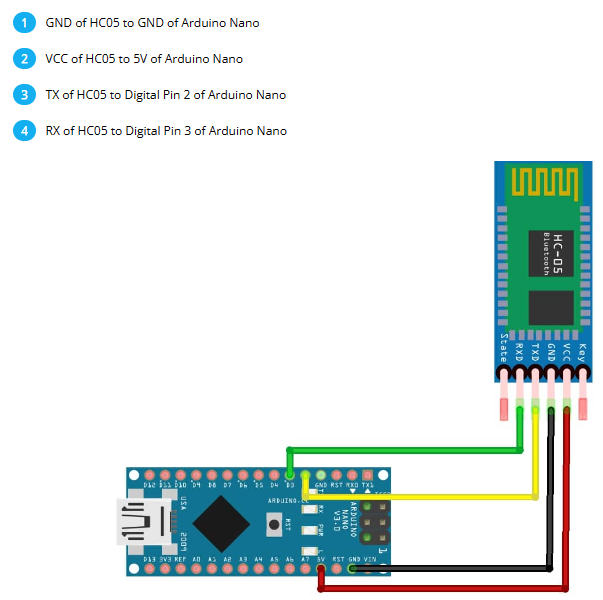
### <span class="TextRun MacChromeBold SCXP205920620 BCX0" data-contrast="none" data-usefontface="true" lang="EN-US" xml:lang="EN-US"><span class="NormalTextRun SCXP205920620 BCX0">Wiring Setup</span></span>

#### <a class="CID4a8a75dc-27f3-4628-9147-792a285200be" data-sessionid="37e57817-2d7f-490c-9666-38b582ce322f" data-shapeids="4" data-slideid=""> </a><a class="CIDb98589f8-a717-4180-96d3-005f7f3aab24" data-sessionid="37e57817-2d7f-490c-9666-38b582ce322f" data-shapeids="8" data-slideid=""> </a><a class="CIDb98589f8-a717-4180-96d3-005f7f3aab24" data-sessionid="37e57817-2d7f-490c-9666-38b582ce322f" data-shapeids="8" data-slideid="">![Arduino Android IOS HM-10 BLE Bluetooth 4.0 CC2540 CC2541 Serial Wireless  Module | eBay](https://secretlibrary.rccf.club/uploads/images/gallery/2023-11/tYhhewWtzNVtab1y-embedded-image-7yvdokvo.jpg)</a><a class="CID715f18e2-f32f-4d48-8d96-a71e31f8ba7d" data-sessionid="37e57817-2d7f-490c-9666-38b582ce322f" data-shapeids="4" data-slideid=""> </a><a class="CIDd69b3559-e162-4661-848b-b2adc48cec02" data-sessionid="37e57817-2d7f-490c-9666-38b582ce322f" data-shapeids="5" data-slideid=""> </a>[![image.png](https://secretlibrary.rccf.club/uploads/images/gallery/2023-11/scaled-1680-/yQDclO7pOoiV3x3Z-image.png)](https://secretlibrary.rccf.club/uploads/images/gallery/2023-11/yQDclO7pOoiV3x3Z-image.png)![arduino_cc2541_wiring.png](https://secretlibrary.rccf.club/uploads/images/gallery/2023-11/SQLxetTq4XrKhNiR-embedded-image-qvijlkwj.png)
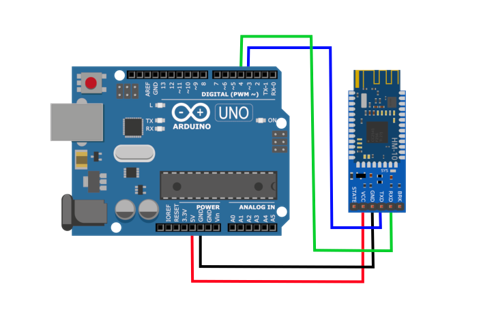
<div id="bkmrk-hm-10-module%E2%80%8B-arduin"><table border="1" class="Table TableWordWrap ExportedPPTTable"><tbody><tr class="TableRow" role="row"><td class="TableCellRelativePosition" colspan="1" data-celllook="0" rowspan="1"><span class="TextRun MacChromeBold" data-contrast="none" data-usefontface="false" lang="EN-US" xml:lang="EN-US"><span class="NormalTextRun">HM-10 Module</span></span><span class="EOP">​</span>

</td><td class="TableCellRelativePosition" colspan="1" data-celllook="0" rowspan="1"><span class="TextRun MacChromeBold" data-contrast="none" data-usefontface="false" lang="EN-US" xml:lang="EN-US"><span class="NormalTextRun">Arduino Nano</span></span><span class="EOP">​</span>

</td></tr><tr class="TableRow" role="row"><td class="TableCellRelativePosition" colspan="1" data-celllook="0" rowspan="1"><span class="TextRun" data-contrast="none" data-usefontface="false" lang="EN-US" xml:lang="EN-US"><span class="NormalTextRun">STATE</span></span><span class="EOP">​</span>

</td><td class="TableCellRelativePosition" colspan="1" data-celllook="0" rowspan="1"><span class="EOP">Don't worry abt it</span>

</td></tr><tr class="TableRow" role="row"><td class="TableCellRelativePosition" colspan="1" data-celllook="0" rowspan="1"><span class="TextRun" data-contrast="none" data-usefontface="false" lang="EN-US" xml:lang="EN-US"><span class="NormalTextRun">RXD</span></span><span class="EOP">​</span>

</td><td class="TableCellRelativePosition" colspan="1" data-celllook="0" rowspan="1"><span class="EOP">​D3</span>

</td></tr><tr class="TableRow" role="row"><td class="TableCellRelativePosition" colspan="1" data-celllook="0" rowspan="1"><span class="TextRun" data-contrast="none" data-usefontface="false" lang="EN-US" xml:lang="EN-US"><span class="NormalTextRun">TXD</span></span><span class="EOP">​</span>

</td><td class="TableCellRelativePosition" colspan="1" data-celllook="0" rowspan="1"><span class="EOP">​D2</span>

</td></tr><tr class="TableRow" role="row"><td class="TableCellRelativePosition" colspan="1" data-celllook="0" rowspan="1"><span class="TextRun" data-contrast="none" data-usefontface="false" lang="EN-US" xml:lang="EN-US"><span class="NormalTextRun">GND</span></span><span class="EOP">​</span>

</td><td class="TableCellRelativePosition" colspan="1" data-celllook="0" rowspan="1"><span class="EOP">​GND</span>

</td></tr><tr class="TableRow" role="row"><td class="TableCellRelativePosition" colspan="1" data-celllook="0" rowspan="1"><span class="TextRun" data-contrast="none" data-usefontface="false" lang="EN-US" xml:lang="EN-US"><span class="NormalTextRun">VCC</span></span><span class="EOP">​</span>

</td><td class="TableCellRelativePosition" colspan="1" data-celllook="0" rowspan="1"><span class="EOP">​5v</span>

</td></tr><tr class="TableRow" role="row"><td class="TableCellRelativePosition" colspan="1" data-celllook="0" rowspan="1"><span class="TextRun" data-contrast="none" data-usefontface="false" lang="EN-US" xml:lang="EN-US"><span class="NormalTextRun">EN</span></span><span class="EOP">​</span>

</td><td class="TableCellRelativePosition" colspan="1" data-celllook="0" rowspan="1"><span class="EOP">Don't worry abt it</span>

</td></tr></tbody></table>

<table border="1" class="Table TableWordWrap ExportedPPTTable"><tbody><tr class="TableRow" role="row"><td class="TableCellRelativePosition" colspan="1" data-celllook="0" rowspan="1"><span class="TextRun MacChromeBold" data-contrast="none" data-usefontface="false" lang="EN-US" xml:lang="EN-US"><span class="NormalTextRun">HM-10 Module</span></span><span class="EOP">​</span>

</td><td class="TableCellRelativePosition" colspan="1" data-celllook="0" rowspan="1"><span class="TextRun MacChromeBold" data-contrast="none" data-usefontface="false" lang="EN-US" xml:lang="EN-US"><span class="NormalTextRun">Arduino Uno</span></span><span class="EOP">​</span>

</td></tr><tr class="TableRow" role="row"><td class="TableCellRelativePosition" colspan="1" data-celllook="0" rowspan="1"><span class="TextRun" data-contrast="none" data-usefontface="false" lang="EN-US" xml:lang="EN-US"><span class="NormalTextRun">STATE</span></span><span class="EOP">​</span>

</td><td class="TableCellRelativePosition" colspan="1" data-celllook="0" rowspan="1"><span class="EOP">Don't worry abt it</span>

</td></tr><tr class="TableRow" role="row"><td class="TableCellRelativePosition" colspan="1" data-celllook="0" rowspan="1"><span class="TextRun" data-contrast="none" data-usefontface="false" lang="EN-US" xml:lang="EN-US"><span class="NormalTextRun">RXD</span></span><span class="EOP">​</span>

</td><td class="TableCellRelativePosition" colspan="1" data-celllook="0" rowspan="1"><span class="EOP">​D4</span>

</td></tr><tr class="TableRow" role="row"><td class="TableCellRelativePosition" colspan="1" data-celllook="0" rowspan="1"><span class="TextRun" data-contrast="none" data-usefontface="false" lang="EN-US" xml:lang="EN-US"><span class="NormalTextRun">TXD</span></span><span class="EOP">​</span>

</td><td class="TableCellRelativePosition" colspan="1" data-celllook="0" rowspan="1"><span class="EOP">​D3</span>

</td></tr><tr class="TableRow" role="row"><td class="TableCellRelativePosition" colspan="1" data-celllook="0" rowspan="1"><span class="TextRun" data-contrast="none" data-usefontface="false" lang="EN-US" xml:lang="EN-US"><span class="NormalTextRun">GND</span></span><span class="EOP">​</span>

</td><td class="TableCellRelativePosition" colspan="1" data-celllook="0" rowspan="1"><span class="EOP">​GND</span>

</td></tr><tr class="TableRow" role="row"><td class="TableCellRelativePosition" colspan="1" data-celllook="0" rowspan="1"><span class="TextRun" data-contrast="none" data-usefontface="false" lang="EN-US" xml:lang="EN-US"><span class="NormalTextRun">VCC</span></span><span class="EOP">​</span>

</td><td class="TableCellRelativePosition" colspan="1" data-celllook="0" rowspan="1"><span class="EOP">​5v</span>

</td></tr><tr class="TableRow" role="row"><td class="TableCellRelativePosition" colspan="1" data-celllook="0" rowspan="1"><span class="TextRun" data-contrast="none" data-usefontface="false" lang="EN-US" xml:lang="EN-US"><span class="NormalTextRun">EN</span></span><span class="EOP">​</span>

</td><td class="TableCellRelativePosition" colspan="1" data-celllook="0" rowspan="1"><span class="EOP">Don't worry abt it</span>

</td></tr></tbody></table>

</div><div id="bkmrk-"></div>### Dabble The App!

### <a class="CIDcd73b63c-b77e-4289-8386-e86c9d4e0a43" data-sessionid="37e57817-2d7f-490c-9666-38b582ce322f" data-shapeids="4" data-slideid=""> </a><a class="CID002dc913-9ed7-4a25-83d8-3bb22cdf9f5e" data-sessionid="37e57817-2d7f-490c-9666-38b582ce322f" data-shapeids="4" data-slideid=""> </a><a class="CID23bf3fae-2ecb-4728-8141-1d1264cf5ee7" data-sessionid="37e57817-2d7f-490c-9666-38b582ce322f" data-shapeids="5" data-slideid=""> </a><a class="CIDcd73b63c-b77e-4289-8386-e86c9d4e0a43" data-sessionid="37e57817-2d7f-490c-9666-38b582ce322f" data-shapeids="4" data-slideid="">![Getting Started with Dabble App to Control Arduino, ESP32 and evive](https://secretlibrary.rccf.club/uploads/images/gallery/2023-11/zrCj6RQDjJyuNKJT-embedded-image-9lustchb.jpg)</a><a class="CIDcd73b63c-b77e-4289-8386-e86c9d4e0a43" data-sessionid="37e57817-2d7f-490c-9666-38b582ce322f" data-shapeids="4" data-slideid="">![Game Pad](https://secretlibrary.rccf.club/uploads/images/gallery/2023-11/voeadlLqWP7G1UuH-embedded-image-xfxtjou6.jpg)</a>

##### <span class="TextRun MacChromeBold SCXP53443354 BCX0" data-contrast="none" data-usefontface="true" lang="EN-US" xml:lang="EN-US"><span class="NormalTextRun SCXP53443354 BCX0">We'll be using the digital mode of the </span></span><span class="TextRun MacChromeBold SCXP53443354 BCX0" data-contrast="none" data-usefontface="true" lang="EN-US" xml:lang="EN-US"><span class="NormalTextRun SCXP53443354 BCX0">Gamepad Module</span></span><span class="EOP SCXP53443354 BCX0">​</span>

- <span class="TextRun MacChromeBold SCXP53443354 BCX0" data-contrast="none" data-usefontface="true" lang="EN-US" xml:lang="EN-US"><span class="NormalTextRun SCXP53443354 BCX0">Feel free to try any of the other modes/modules!</span></span><span class="EOP SCXP53443354 BCX0">​</span>
- <span class="TextRun MacChromeBold SCXP53443354 BCX0" data-contrast="none" data-usefontface="true" lang="EN-US" xml:lang="EN-US"><span class="NormalTextRun SCXP53443354 BCX0">You'll have </span></span><span class="TextRun MacChromeBold SCXP53443354 BCX0" data-contrast="none" data-usefontface="true" lang="EN-US" xml:lang="EN-US"><span class="NormalTextRun SCXP53443354 BCX0">10 </span></span><span class="TextRun MacChromeBold SCXP53443354 BCX0" data-contrast="none" data-usefontface="true" lang="EN-US" xml:lang="EN-US"><span class="NormalTextRun SCXP53443354 BCX0">digital (ON or OFF) buttons you can use :)</span></span>

### <span class="TextRun SCXP267016145 BCX0" data-contrast="auto" lang="EN-US" xml:lang="EN-US"><span class="NormalTextRun SCXP267016145 BCX0">The Code &lt;3</span></span>

<span class="TextRun SCXP267016145 BCX0" data-contrast="auto" lang="EN-US" xml:lang="EN-US"><span class="NormalTextRun SCXP267016145 BCX0">You'll need use a specific library to use the dabble app! </span></span>

<span class="TextRun SCXP267016145 BCX0" data-contrast="auto" lang="EN-US" xml:lang="EN-US"><span class="NormalTextRun SCXP267016145 BCX0">The library is already on the Arduino IDE so just search for it in the Library Manager. </span></span>

<span class="TextRun SCXP267016145 BCX0" data-contrast="auto" lang="EN-US" xml:lang="EN-US"><span class="NormalTextRun SCXP267016145 BCX0"> ^^^ you'll want to install the 1.5.2 version &lt;3</span></span>

<span class="TextRun SCXP267016145 BCX0" data-contrast="auto" lang="EN-US" xml:lang="EN-US"><span class="NormalTextRun SCXP267016145 BCX0"><span class="TextRun MacChromeBold SCXP9192314 BCX0" data-contrast="none" data-usefontface="true" lang="EN-US" xml:lang="EN-US"><span class="NormalTextRun SCXP9192314 BCX0">Check out </span></span>[<span class="TextRun SCXP9192314 BCX0" data-contrast="none" data-usefontface="true" lang="EN-US" xml:lang="EN-US"><span class="NormalTextRun SCXP9192314 BCX0">this video</span></span>](https://www.youtube.com/watch?v=ypMJ7j0MpD8&t=108s)<span class="TextRun SCXP9192314 BCX0" data-contrast="none" data-usefontface="true" lang="EN-US" xml:lang="EN-US"><span class="NormalTextRun SCXP9192314 BCX0"> </span></span><span class="TextRun MacChromeBold SCXP9192314 BCX0" data-contrast="none" data-usefontface="true" lang="EN-US" xml:lang="EN-US"><span class="NormalTextRun SCXP9192314 BCX0">if confused on how to install a library.</span></span><span class="EOP SCXP9192314 BCX0">​</span></span></span>

##### Here's some [code](https://github.com/sam-shack/SumoBot-Controls) you can start with : )

```c
/*
SUMOBOT CONTROLS for Dabble app and HM-10 module!!!!
 
   To control your bots we'll use the Gamepad module. 
   The Gamepad module provides three different modes this one is set up for Digital mode. (check out the other modules and modes if you'd like!!)
       - Digital mode gives you 10 buttons :)

   More INFO on Dabble: https://thestempedia.com/docs/dabble/game-pad-module/ 
*/

//include lines 8-10 so you can work with the right library *make sure you downloaded 1.5.2 version (see pwrpoint for instructions)
#define CUSTOM_SETTINGS
#define INCLUDE_GAMEPAD_MODULE
#include <Dabble.h>

//below is the setup for the bluetooth and Serial Monitor 
void setup() {
  // put your setup code here, to run once:
  Serial.begin(250000);      // IMPORTANT: make sure your Serial Monitor is also set at this baud rate. 
  Dabble.begin(9600);      // this is the baudrate of your bluetooth 
}

void loop() {
  Dabble.processInput(); //this function is used to refresh data obtained. Calling this function is mandatory in order to get data properly from your phone.
  Serial.print("KeyPressed: "); // This is just printing into the Serial Monitor good way to check if you're connected :) 

/*
THE WAY IT WORKS:
   When you click one of the buttons on the app it'll register as ON in the Arduino script and run whatever you have under the if (GamePad.isBLAHPressed())
    ... SO instead of having Serial.print("BLAH") put in your own commands such as turning ON your right_motor
    ^^ These commands will depend on what functions you want and what motor driver you went with

FOR WHAT IS WRITTEN BELOW:     
~ using the Serial.print commands below can be helpful to test that the bluetooth is successfully connected ~ 
*/

  if (GamePad.isUpPressed())
  {
    Serial.print("UP");
  }

  if (GamePad.isDownPressed())
  {
    Serial.print("DOWN");
  }

  if (GamePad.isLeftPressed())
  {
    Serial.print("Left");
  }

  if (GamePad.isRightPressed())
  {
    Serial.print("Right");
  }

  if (GamePad.isSquarePressed())
  {
    Serial.print("Square");
  }

  if (GamePad.isCirclePressed())
  {
    Serial.print("Circle");
  }

  if (GamePad.isCrossPressed())
  {
    Serial.print("Cross");
  }

  if (GamePad.isTrianglePressed())
  {
    Serial.print("Triangle");
  }

  if (GamePad.isStartPressed())
  {
    Serial.print("Start");
  }

  if (GamePad.isSelectPressed())
  {
    Serial.print("Select");
  }
  Serial.print('\t');

}
```